For mymind subscribers

A mymind alternative that keeps your files

The same visual, no-filing library. The difference is underneath: every save lands in a folder on your own computer as a markdown file with the original next to it. Delete Tenoa and the library is still there

$49 once · Up to three desktop computers · 14-day free trial

If you stop paying, everything keeps working

My Library
⌕   ···
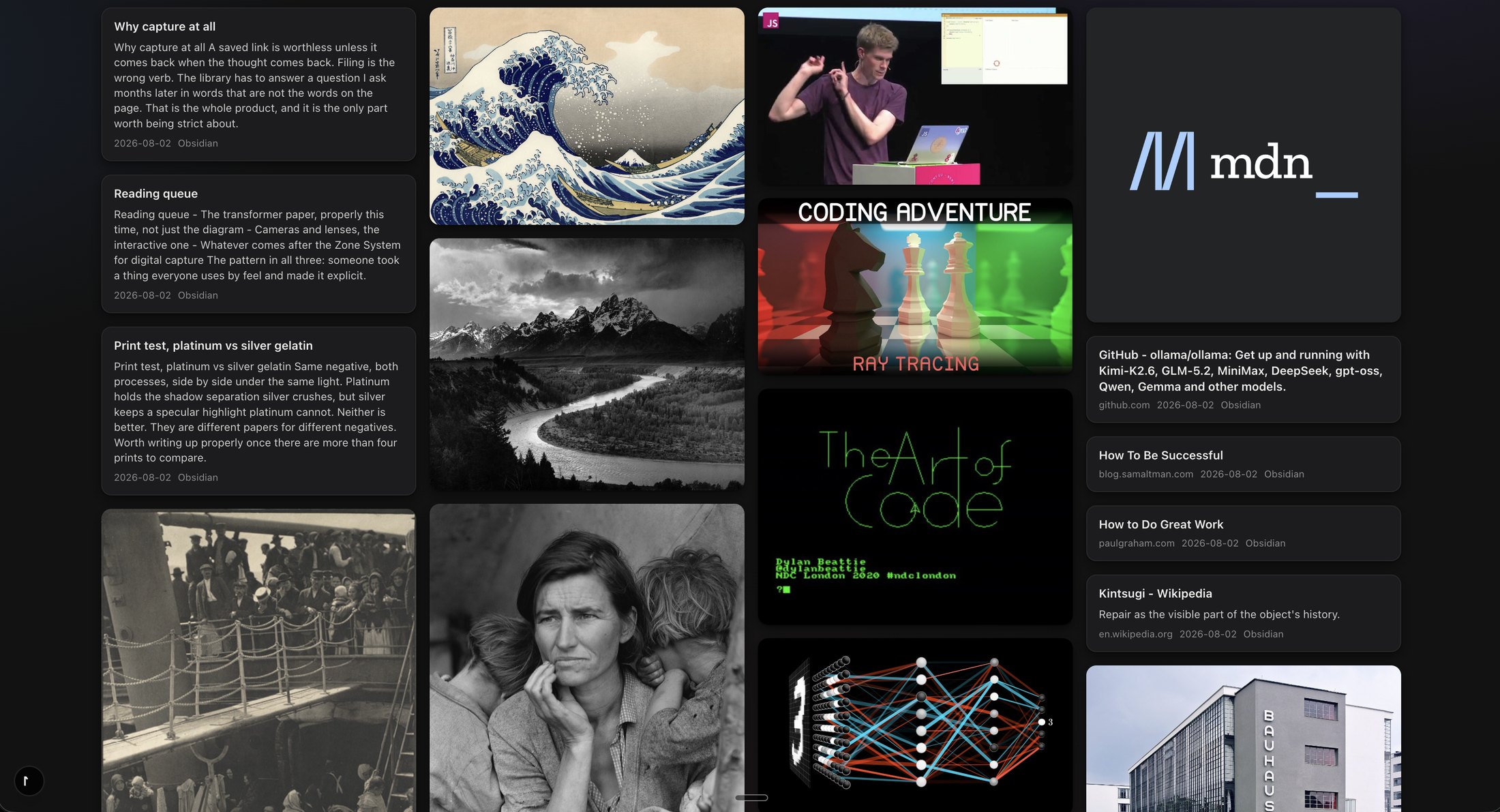
A masonry wall of saved images, articles, videos and notes in Tenoa

What changes when you switch

No account Files on your disk No subscription Import runs on your computer

mymind is good. That needs saying up front, because most alternative pages open by pretending the thing you are leaving was bad, and you already know it wasn't. The saving is effortless, the grid is beautiful, and the no-filing idea is right.

The problem is where everything lives. Your library sits on their servers. The yearly plan keeps the door open, and the day you stop paying, your access to your own saves goes with it.

Tenoa keeps the part mymind got right and changes the part underneath. Every save lands in a folder on your own computer as a markdown file with the original beside it. Delete Tenoa and the library is still sitting there, readable in any editor.

I built it because I was one of those subscribers. I pulled my last 16,352 saves out of mymind, turned them into plain files, and cancelled.

Side by side

How the two actually compare

The honest version, including where mymind is still ahead

mymindTenoa
Where your library livesmymind's serversA folder on your own disk
What a save becomesAn entry in their systemA markdown file plus the original asset
If you stop payingAccess ends with the planThe app and your files keep working
Saving an imageRight-click through the extension, or a save button on some sitesA save button appears when you hover the image, on any site
SearchTheir AI search, on their serversRuns on your computer. Nothing is sent off to be indexed
Summaries and image understandingBuilt in, on their infrastructureOn your computer with a local model, or through an AI service you connect with your own key
MobileiPhone and AndroidiPhone and iPad, free. No Android
Polish and maturityYears ahead. The best-looking product in this categoryYounger. One developer
PriceA yearly plan, every year$49 once. Optional $29 a year for hosted sync and new features

What "keeps your files" means

Nothing to export. It was always yours

Every item in Tenoa is a markdown file you can open anywhere, with images and PDFs saved beside it in a normal folder. Tenoa keeps a search index on top so everything stays fast. That index is throwaway. It rebuilds itself from the files whenever it needs to

Three things follow. There is no export step, because the files were yours from the moment you saved them. Any other tool can read the library: a text editor, a backup script, your own AI setup. The app going away is an inconvenience, not a loss

Read the plain-English privacy answer
Tenoa LibraryOn My Mac
MD
Kintsugi.mdMarkdown document · 3 KB · your note, the summary, the tags
JPG
kintsugi-bowl.jpgJPEG image · 2.1 MB · the original, untouched
MD
The Art of Code.mdMarkdown document · 41 KB · transcript and chapters
PDF
attention-paper.pdfPDF document · 2.2 MB

Moving over

Bring your mymind library home

mymind exports the original files plus one spreadsheet. Tenoa reads that export and turns it into files on your disk. The whole thing runs on your own computer. Your export never gets sent anywhere, not to me, not to a Tenoa server, not to anyone

  1. Export from mymindAccount page, "Export my mind". Desktop Chrome or Edge only. You get every image and PDF plus cards.csv with your notes, quotes, tags and dates
  2. Check what you gotDo this before you cancel. mymind has no import, so the export is the only copy once the account closes
  3. Drop it into TenoaPoint the importer at the folder. Your tags come across. Spaces don't export, but tags cover most of the same ground
The full step-by-step import guide
mymind Export13,906 items · 8 GB
CSV
cards.csv16,352 rows · notes, quotes, tags, dates
JPG
7f3a…e2.jpgand 13,905 more
wifi off import runs here, on your computer
Tenoa Library16,352 items · zero failures
MD
The Great Wave.mdyour note · tags · saved 2021-03-14
JPG
the-great-wave.jpgthe original, untouched

Fair is fair

Who should stay on mymind

Switching costs an afternoon. It is only worth it if the thing that bothers you is the thing Tenoa fixes

  • You want zero setup on any device you touch, foreverand the yearly plan doesn't bother you. mymind's cloud is the convenience you are paying for, and it is real
  • You live on Android todayTenoa has free iPhone and iPad apps. It does not have Android
  • You want the most polished version of this category that existsmymind has years of design head start and it shows. Tenoa is younger and built by one person

If none of those hold, and the thing that bothers you is that your saved life sits on someone else's servers, that is the exact itch Tenoa exists to scratch

Pricing

Buy the app.
Keep the app

One purchase instead of a yearly plan. The optional annual covers the part that costs money to keep running. It does not rent your own library back to you

Launch price

Tenoa desktop

$49 once

One license for up to three desktop computers, plus your first year of Tenoa Sync + Updates

  • The full desktop app
  • Files stored on your own devices
  • Mac and Windows count together
  • iPhone and iPad apps free
  • 14-day free trial, no card needed
  • 14-day, no-questions refund
Download the free 14-day trial

Your license key arrives by email within a minute of purchase. Refunds are honored for 14 days, no questions asked. Write to hello@tenoa.app if anything goes sideways

Optional after year one

Tenoa Sync + Updates

$29 / year

Hosted syncing across networks, plus new features released after your included year

  • Tenoa-hosted device sync
  • New features while current
  • Same-network sync stays free
  • Security fixes stay free
  • Compatibility fixes stay free

If you stop paying, everything you already own keeps working

FAQ

Questions people leaving mymind ask

Is there a mymind alternative that stores everything locally?+

Yes. Tenoa saves every item as a markdown file in a folder on your own computer, with the original image, PDF or page content next to it. The visual library and search sit on top of those files rather than on a hosted database

Can I import my mymind library into Tenoa?+

Yes. Export your library from mymind, drop the export into Tenoa, and it becomes plain files on your disk. Nothing leaves your computer. Proven on 16,352 cards and 13,906 images and PDFs with zero failures. The import guide has the steps

What happens to my Tenoa library if I stop paying?+

Nothing. The one-time purchase is yours. Lapsing the optional annual turns off the hosted sync service and pauses new features. Everything on your computer keeps working, including same-network sync between your devices

Does Tenoa's search send my saves to a server?+

No. Search and indexing run on your computer. Summaries run locally too, or through an AI service you connect with your own key, which is a setting you control

Is Tenoa as polished as mymind?+

Not yet, honestly. mymind has years of head start and a team. Tenoa trades some of that polish for an architecture where the files are yours, and it is built by one person who uses it every day

What platforms are supported?+

Today, Tenoa is a Mac app with the Safari extension built in, plus a local web app for Safari, Chromium, and Firefox. The free iPhone and iPad apps are in App Review. The signed Windows installer is targeted for October 1

Your saves,
as files you keep

Try it on your own mymind export first. The trial is 14 days and needs no card